Friday, March 8, 2013

Scoot & Doodle - Collaborative Drawing


Scoot & Doodle is a collaborative drawing environment that utilizes Google+ Hangouts to collaborate on drawings.  In order to use the service for collaboration users must have a Google account.  Scoot & Doodle does offer an incentive for schools that might be interested in piloting a iPad program.  The software has all the usual drawing features as well as some others not seen on other collaborative type services.  Once creations are completed users can revisit, add on, and share drawings from the digital portfolio.  See the video below of a sample of Scoot & Doodle in use.

Stitch - Create Digital Stories on iPhone


Stitch is a free app for the iPhone (with paid upgrades for more features) for the iPhone that allows users to easily create digital stories from their phone.  Users can use available templates and effects to create their story.  Images can be added by what is saved on phones locally or through a Google Search within the App.  To use the app to create a presentation does not require an Internet signal.  When users are finished creating their presentation it is converted to an MP4 file and can be shared with anyone.  To understand how Stitch works, check out the video below.


Thursday, March 7, 2013

Will 3D Printing Be the Next "Big Thing" in Education


Recently while watching television shows on the major networks I have observed references to 3D printers as part of the plot line.  These references got me thinking about how 3D printing might impact or change teaching opportunities.  Granted, the 3D printing systems are still not nearly affordable for the average school district, but there was a time when a color laser printer was viewed the same way.  In 5-10 years when the price of 3D printing has decreased, will educators see them placed in classrooms?

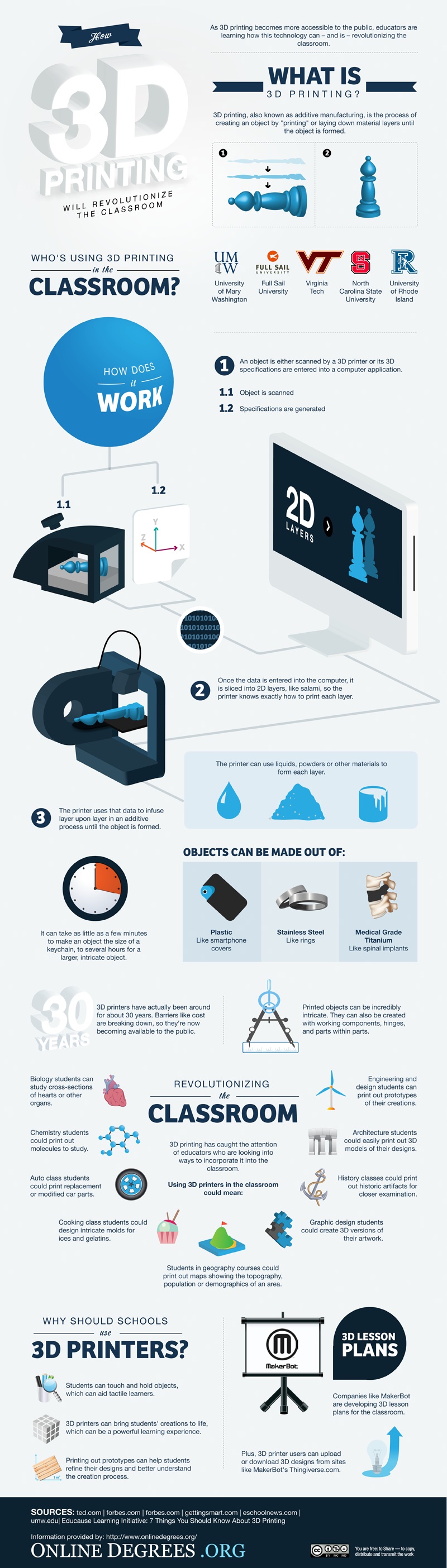
First we must understand what a 3D printer is and how it works.  Currently they can use liquids, powders, and other materials to form each layer.  The time it takes to print something depends on the size of the object being printed.  Objects can be made from plastic, stainless steel, and medical grade titanium.  Printed objects can be created with working components, hinges, and parts within parts.  Imagine for a minute being able to print a compass in a math class for your students.

With a 3D printer students can touch and hold objects, which will assist in bringing student creations to life.  Students can also make prototypes of designs to help better understand the creation process.  How could this information be used in the classroom?  Science classrooms could make replicas of body parts and print out molecules to study.  Home Economics classes could print out replicas of food they want to make.  Geography students could literally print out topographic maps and city landscapes.  Want to take your kids to New York City?  Print a replica and virtually visit all the skyscrapers.  History students could print out historic artifacts.  Geometry teachers could print out shapes to measure and calculate.  English students could create replicas of Shakespeare's theaters.  We have students that are using CAD and I could imagine the possibilities of them being able to print out their final projects.  These are ideas just scratching the surface.  
Below is an infographic explaining 3D Printing and where I got much of the information above (Click to enlarge).

And if you haven't seen it, the first 3D Pen is in development as well; 3Doodler.  

What are your thoughts about 3D Printing in Education?

Wednesday, March 6, 2013

Organize Anything in a Fun and Sociable Way


Organisr is a free and collaborate way to organize lists, to dos, or ideas.  Users have the ability to create multiple lists that contain color coded items while also allowing users to move any item from one list to the next.  Creating an account is easy; all users need is their name, username, email address, and a password.  Users can mark things complete and then incomplete if need be, and when they are completed, they get marked through.  Users can assign tasks on the list to fellow users as well and determine task color and background color.  If unsure about how you will use the service, there is a sample page that users can utilize to learn how to utilize the service.  Organisr has a simple interface and seems very user-friendly.

I could see teachers utilizing Organisr to organize lesson plans and various activities for their classrooms.  It could also be utilized to brainstorm ideas for lessons and the color codes could be used to match them up. Department heads could collaborate to use the service to determine department based initiatives and make plans for achieving them.  Students could use Organisr to divide up responsibilities for a project and then track completion of the members of the group.  

A Free Search Engine for Learning


Gooru, currently in Beta, allows users to search for educational resources, collections, and quizzes.  At the top of the page, users have the ability to see current featured collections.  Users can also click on categories from the various Core Subject Resources which are divided up by middle school and high school.  With Gooru, users have the ability to customize collections, collaborate with other teachers, upload materials, and find content aligned to Common Core State Standards.

To learn more about Gooru, users can join the Teachers Using Gooru Community to get further assistance.  Each collection could include pictures, articles, videos, and more.  From the collections, students can take quizzes in order to self assess their learning.  There is also a Gooru Collections App available for iPads that allows users to search through the collections, play games, watch videos, read textbooks, and take notes.

Users can create an account for free.  In order to join the beta version, users will need to provide their birth date and email address.  For more information, see the video below