Showing posts with label Android. Show all posts

Thursday, March 21, 2013

Filedrop - Turn Your Phone into a Wireless USB Stick


Filedrop is an app that allows users to send files between devices within one network.  Users can launch Filedrop on two devices and then drag and drop files between them.  The theory with this app is that sharing files will be as easy as passing a pen.  Users can send files to any nearby devices, turn their phone into a wireless USB stick, stream photos, or play music.

Filedrop allows users to easily share files across platforms; meaning easily share between a Mac and Windows PC as long as both computers have the app downloaded.  Currently, the only versions that are available are for computers with iDevice and Android apps coming in the near future.  Users can sign up to receive notification when the Apps are available.  Once the Apps are available, I could see this as a valuable tool for teachers and students as sharing across platforms becomes a necessity.

See the video below for more information.


"Keep" it Together with Google


Yesterday through their Blog, Google announced a new note-taking app called Google Keep.  "With Keep you can quickly jot ideas down when you think of them and even include checklists and photos to keep track of what’s important to you. Your notes are safely stored in Google Drive and synced to all your devices so you can always have them at hand."  If you prefer to speak instead of type, that is fine, because Google Keep transcribes voice memos as well.  Users can also use a search to find archived and even deleted notes.

As users create notes you can change the color of those notes and move them around throughout the app as well.  "You can access, edit and create new notes on the web at http://drive.google.com/keep and in the coming weeks you'll be able to do the same directly from Google Drive."  For more information, see the video below.


Tuesday, March 19, 2013

Send Files Anywhere


Send Anywhere is a service for sending files by acquiring a code that is used on the site to retrieve the file.  Users can upload a file and when doing so receive a code that they can then send through email, text message, or however.  The file can also be shared via QR Code as well.  Users can visit the Send Anywhere website and type in the code to receive the file.  You can also download the Android App or the iDevice App as well.  The use of the Apps makes it easier to both send and receive files.

Friday, March 15, 2013

Google Field Trip


Google Field Trip is an iDevice App and Android App that allows users to discover the hidden things around you while you travel around our world.  Field Trip runs in the background of a phone and when a user gets close to something interesting it will notify them.  If a headset or bluetooth is connected, the app will even read the information to the users.  For education purposes, the app will help users learn about the local history and even provide other information like eating options.  The information feeds that users choose will help determine the information that the app provides.  To see a promotional video for the app, see the video below.


Word of caution...it currently is quite the drain on the battery according to some reviews.  However, I could see how this app could be utilized for classroom field trips.  

Friday, February 15, 2013

BUMP Provides Ability to "Bump" Even More


I recently wrote a post discussing how the Bump App for Android and Apple now had the ability to Bump pictures to your computer.  In the most recent update to the service, users can now bump a lot more.  By using the app and "bumping" your phone to the spacebar, users can easily share videos, files, audio, photos, and everything from their phone.

With phones increasingly becoming a valuable tool in the classroom, it is going to be worthwhile to utilize what apps and tools are available to easily make files available.  As students are using their phones for video and photo projects, Bump could be a valuable tool for teachers to use to gain access to student work.  It might also be a good way for teachers to collect contact information of parents, students, or athletes if they are a coach.  

Monday, January 21, 2013

Turn Google Search into an App Search


I think that I have finally made the change over to Google Chrome as my browser of choice.  I truly had not become aware of the ability to use the apps available within the browser and how easily it makes it to connect to outside apps that I find myself using all the time (Evernote, Reader, Blogger, etc).  While doing a Google Search I discovered/noticed an option for "Applications" within the options where you can select Images, Maps, Shopping, etc.

By clicking on the Application link users will be provided applications related to their search.  You will be able to find apps for iTunes, Google Play, and Google Chrome.  This could help if looking for tools for productivity or organization.  It could also help if looking for reference tools and other information.


My School Notebook


I recently did a post with 10 Apps for Students to Take Notes and after typing that came across My School Notebook which is a Google Chrome App and an independent app that students can use to help organize and keep their notes on the web.  Students can also use the service on both Android devices and Apple devices.  To use the service, students can log in by connecting to Facebook or create an account with an email and password.  What makes this service even better is the ability to use the service offline.

Like most tools, the collaboration and sharing options make it a usable tool for students who are absent or maybe need more assistance in learning how to take notes.  There is also a drawing feature that allows for notes in classes that require diagrams or other types of illustrations.  Students can create different notebooks for different subjects making organization easier.  To learn more about the functions of My School Notebook, CLICK HERE.

Sunday, January 20, 2013

Turn Your Phone into a Presentation Remote


If you are a user of Chrome or Safari as your web browser and use presentation software such as SlideShare, Google Docs Presentation, or PowerPoint, then you have the ability, through a Chrome Web store App and a Phone App to turn your phone into a presentation remote.  You can see the presentation below and visit Presentation Remote for more information.

In order for the service to work you would need to download the free app de Modo for either Android devices or iPhone Devices.  What is cool is that this same app will work with Pandora Radio and with YouTube where you can turn your phone into a remote control for YouTube.  In another way through this app your phone can serve as a monitor extension as well and the ability to drag and drop from your phone to your computer, just as if you had a secondary monitor.


I am not quite an avid user of Google Chrome over Firefox, not really sure why, but it appears that the apps available for Chrome might make it worth a switch.  This is just one example.

Monday, January 7, 2013

3 SMS Resources

KikuText is an additional method for teachers to engage in communication with parents.   With the free version, teachers get 60 messages a month and 2 classes for messages to 15 parents.  A pro version is just $10 a month and you get unlimited messages, up to 7 classes and 170 parents.  With the service, parents would get a text message with a comment about their child which they can respond too.  The conversation history with the parent would be saved so it can be viewed and know where the conversation left off.  An inbox allows for easy viewing and conversations remain safe and private.

Kikutext has messaging templates that make it easy to update parents about what the students are doing in class and they can be customizable as well.  Scheduling of the messages is also available.  To make it work, you provide a code to the parents that they text in and the information the parent provides is automatically captured.  If the cell phone number of the parent is available, you can text them directly as well.  See the SlideShare presentation for more information.


Understoodit is a audience response services that allows users to get simple feedback on whether a lecture/discussion/activity was understood or not.  With the creation of an account (Free or Paid...although free is limited) users can provide students with a simple URL to provide to students.  Using any device students can respond "understood" or "confused."  As students answer, data is provided in real time informing teachers on whether or not re-teaching is necessary.  See the video on their front page for more information.


ClassParrot is another option in the growing market for SMS messaging with students and parents.  Like Remind 101, this service provides many of the same features.  You provide students a code which gets them into the system.  You create messages on your computer, therefore keeping the students number private. (NOTE: Upon trying to update this post this site was experiencing an error)


As a bonus, if you are interested in texting while driving and you have children of the driving age, you might want to look into Detext.  It's a service that allows the parents to be the "Big Brother is Watching," over their child's cellphone.  From a web browser, users can review driving history, restrict certain settings, and set up alerts, when a child is speeding for example.  Receive alerts via text or email as they happen.

Mobento - Search for Spoken Word in Videos

I have always thought about a search engine for videos based on the content within the videos for when certain words were spoken as part of the dialogue.  I always thought it would be great for finding and logging quotes from movies.  Mobento, currently in beta, provides users the opportunity to do just that; search videos for words that were spoken.  Since it is currently in beta, the database of films is not a large one, but as the word gets out and popularity grows, I can see the popularity of Mobento growing.

When you search for a text you get a listing of all the videos that contain those words.  For each video you get a color coded time stamp of when those words appear and then you can play those sections of the video.  There is currently an Android App which contains over 600 videos which can be streamed or downloaded.  Below is a sample of what a search looks like:


Monday, December 31, 2012

The P.I.N.G. Project


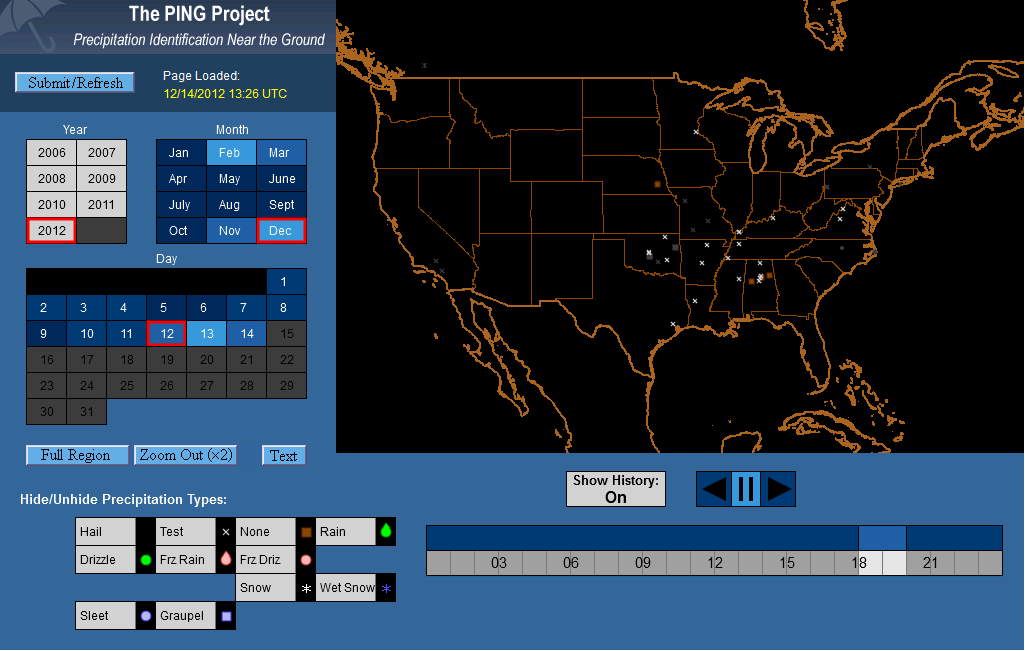
Anyone who follows me on Twitter knows that if I am not tweeting about education and technology, then I am probably tweeting about two other things; weather and the Louisville Cardinals.  This post focuses on a project by the National Severe Storms Laboratory that wants to help identify weather conditions on the ground.  Because radar systems focus on conditions in the upper atmosphere, we often see radar with weather on top of us, but no precipitation falling.  The goal of this project is to help with "nowcasting."  The PING (Precipitation Identification Near the Ground) project uses an iPhone App or Android App to help report current conditions.  If no access to an app is available, then weather reporting can also be done on the PING website.
"PING is looking for young, old, and in-between volunteers to make observations—teachers, classes and families too! We have collected over 45,000 observations since 2006, already making PING successful because of your help."
This tool would be a great addition to science classrooms to report weather conditions for an experiment in a science classroom and have students log when they create a report and see conditions for different areas of your town.  In a recent snowstorm in my area, a range of 30 miles had a difference between 1-6 inches.  As reports go in, they appear on the PING Data Display Page.  You can see a sample image below.


The PING website also provides a valuable lesson for learning about various types of precipitation that can occur during weather events.  Remember that safety is a first priority and people should not put themselves in danger in order to report weather conditions, especially during severe weather.  That should be left to trained and educated professionals.

In education we constantly talk about making it relevant, meaningful, and hands-on.  The PING Project allows for an opportunity to do such reporting while also teaching students about honesty and weather.

Friday, December 7, 2012

Cell Phone Apps for Teachers

Mobile Technology is taking over and as it does, teachers are either all in or have no interest in their use without realizing how beneficial the use of the apps could be in their classroom.  These are the apps that I have seen used recently, used myself, or think have the greatest impact.  Leave me a comment with your favorite App.

The Remind 101 App (also on the Android Market) is a continuation of the website Remind 101 which allows teachers to create lists of students and then send text message reminders to them for completely free.  I used this in my classroom and had several students tell me how it helped them remember to study or complete an assignment.  The service works by providing a code to the teacher to share with students who send it into Remind 101 and they are added to the list the code generates.  To learn more, see the video below.


Three Ring App (Also on Android) allows users to take pictures of student work and keep track of them online.  It is an easy way to organize and present students' real world work from hand written assignments to presentations.  You can also include videos.  Visit ThreeRing to learn more and to sign up.  It is free for teachers.


The Bump App (also available on Android) allows users to easily share contact information, photos, videos, and other files from their cell phones.  The App would be a valuable way to trade contact information with teachers at professional development or with parents if you use your phone as a contact with them.  I could see this being used for coaches as well.  Read a previous post about how to use bump for images to your computer as well.  Teachers could also use it with students to get pictures, lesson


The Wunderlist App (also available on Android) is a necessity for teachers needing assistance with staying organized or are just looking for an app to help them focus on all the requirements of the job.  Due dates for lesson plans, and assignments.  Professional Development, PLC, and school meetings clog your calendar.  Wunderlist provides teachers the ability to easily sync and manage all their "To Dos."


The Socrative App for Teachers and Students (Available on Android as well are the Teacher and Student App) provides users the ability to do use their cellphones as a clicker system.  The Teacher application allows the teacher to not be stuck at their desk running the presentation.  Everything can be done on any device with internet access, but the App allows the teacher to move around and monitor the students.  See the video below for more information.


The Genius Scan App (also available on Android) is an app that allows users to turn the phone into a pocket scanner.  Once you have scanned the documents, it will email them to users as a JPEG or PDF.  The app also easily syncs with Dropbox and Evernote.  Often times within the school or at professional development a resource is shared on paper and you want a copy.  This provides an easy way to turn those paper documents into an electronic copy.  You could also use this app with student work as well.


The Class Dojo App (Mostly for Elementary teachers and currently not available as a Android App) is an app for monitoring, tracking, and sharing the behavior of your students throughout a class period.  The app and the Class Dojo website allows teachers to capture and generate data on the behavior of their students.  Students get real time feedback.  Parents can also receive weekly behavior reports as well.  See the video below for more information and visit their YouTube Channel for helpful videos.


The Evernote App (also available for Android) is a favorite among educators because of its ability to sync all your documents and notes in one place.  Whether it is a computer, phone, or tablet, all notes are synced in one location.  A great tool for when attending conferences, professional development, and faculty meetings.  Accounts and folders can be shared, so with students, it would be easy to share important documents with your students and even parents.   Evernote also allows the saving of pictures and audio files as well.  Teachers could provide a document with audio information as well for students who are struggling readers. 


The Pick Me! App (Currently not available on Android) and the only App I have chosen that has a cost ($1.99 currently) allows users to randomly call on students.  It makes it easy not only to pick names but also track responses on formative assessment.  Data from the formative assessment results is emailed to users.  Various settings allows for multiple uses in the classroom.  It has an option to import rosters using a CSV file through Dropbox if interested.  As a bonus, you might be interested in their Grade It! App (free) which easily provides calculation percentages for determining grades.

Thursday, December 6, 2012

Free Safe Text


Not necessarily a "teaching" tool for the classroom, but a "teaching" tool for life.  Free Safe Text is an app that is currently available for Android phones (iPhone app is currently in development) that helps users resist the urge to text while driving.  The App works by opening the App before you start driving.  Any text message you receive, the sender will get an automatic reply that lets them know you are driving and provides a link to information about the App.

When a person comes to a stop and is no longer driving (not just at a red light) you can place the App in Parking mode and the user will be able to receive text messages again.  During the month of December to encourage the use of the App, they were giving away $25.00 a week based on the number of times the automated message was sent from your phone AND the number of referrals to sign up to use the Free Safe Text App

To sign up for information about when the iPhone release will be available, click here.

For more information, see the video below to learn more.


To learn more about the statistics related to texting while driving, see the video below.

Wednesday, December 5, 2012

Bump Images to you Computer


Most of us that have an iPhone or Android phone have heard of or seen the Bump App that allows users to easily transfer photos and other files from one device to another.  Now that same services offers users the ability to "bump" pictures to your computer.  With bu.mp you can take photos on your phone to your computer by simply visiting the bu.mp website and tapping the space bar with your phone.  Make sure that location is enabled in your browser for it to work.  To see how it works, see the video below.


Another App from the same company that would be of interest is the Flock App.  If students are working on a project together that requires the use of pictures, Flock App would allow the easy sharing of those photos across their mobile devices.