This post has little to do with education, but I wanted to share an interesting experience. On Thursday night I was at home watching the UofL vs. North Carolina A&T game from the NCAA tournament on television. While watching UofL games I like to read what people are saying about the game on Twitter, especially from people that are at the game and get views and comments that are not shared on television. During the game, the following Tweet came across my feed.
I replied because I knew exactly who he was talking about. It was my brother who had just posted a picture of himself at the game on Facebook. Also both of them shared a picture from their seats (One on Facebook, one on Twitter) and they were very identical. So I was able to reply to him and give him a description of what my brother was wearing.
Through this conversation, a person I have been following on Twitter that does not know me or my brother shared a brief "small world" moment. I shared screenshots with my brother to let him know. Unfortunately he did not check his phone for messages from me to try and go say hello. What is also interesting is that I was not the only person to let him know it was my brother. There were multiple replies from other people that knew exactly who he was talking about as well.
This post has little to do directly with education, but it does show the power of Twitter and social media in general and how it can make our world seem a lot smaller for ourselves and our students. There are many people on Twitter from all over the world that could be contacted through Twitter about possibly speaking to classrooms or sharing in intellectual conversations with students and teachers through Twitter. Twitter also provides an opportunity to get information from live events that you might not catch on TV.
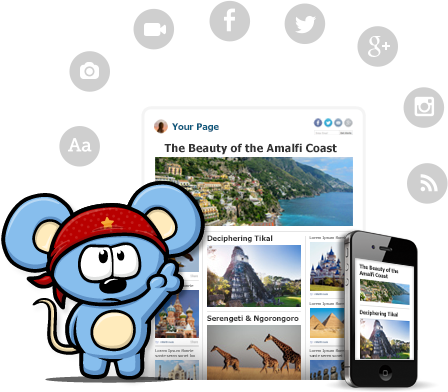
RebelMouse, currently in beta, is a social aggregator that brings your Facebook, Google+, Instagram, and Twitter all into one place and presents it in Pintrest style wall. You can also add various RSS feeds, Pinterest, and other services. If you are using the social media services listed above as an educator and want a main page for students and parents to visit to get all the information shared in one place, RebelMouse would be worth a look. By signing up you get your own page on RebelMouse that you can share with others.
There is also a bookmarklet tool that allows you to easily share new content to your RebelMouse front page. You choose an image, make text edits, and then publish to your front page. As you make any updates to your social profile they will automatically appear on your front page. Last year when I was teaching I had a Twitter Feed, Facebook Page, and a blog for my classroom. RebelMouse would have provided a homepage for students to visit. I also could have easily linked videos and other stories pertinent to class that didn't necessarily require a blog post.
A feature that teachers might also enjoy is the ability to add a post/story directly from your front page. You can add a headline or URL, add pictures, videos, or an album and then write the post. You can also add tags to the story. It turns your front page into a blog at the same time, but also a way to add a post without using the bookmarklet tool.
Sometimes you might have tweets or posts that you don't want to appear. There is a draft section that contains those that RebelMouse is unsure of whether you want to post them or not. You can visit there and add them as necessary. You can also adjust the themes of your page and create your own. There are already several videos on YouTube explaining how to create a theme.
You can see my RebelMouse Front Page for a sample. It is currently just my Twitter feed, but provides you with a sample of what a page would like look. Also, here is a 60 second video with an introduction.
Educational Technology has become a staple in a large portion of schools across the country. Often times it is placed in classrooms and terms are used at conferences that have little meaning to many teachers. Like the lingo of our students, teachers need to be aware of the lingo used relating to educational technology. There are terms and aspects of educational technology that need to be shared and below you will find some of the most popular to date. I hope this list can be used to help clarify questions teachers might have about this growing list of terms.
Web 2.0 - The term given to the current age of the World Wide Web where the web is used for interacting with a web app, and collaboration and sharing with others. Most common examples include Wallwisher, Glogster, Prezi, etc.
PLN - Stands for Professional Learning Network and is the communication and relationship between educators with whom information and resources are often shared. It is an engagement between people that often starts online, but then moves to the real world through conferences and other connections. Twitter and Blogging are the most common place that PLN's grow. For more information about PLN's, visit Project PLN.
Social Media - In a nutshell, it is media that is for the purpose of sharing and interacting socially. It allows media content to be opened for discussion. Social media can include text, audio, video, images, podcasts (see below), and other multimedia communications. YouTube and Skype are good examples.
Social Network - A web-based service that allows individuals to create an online public or private profile with which to share connections with others and engage in discussions and sharing. Facebook, Twitter, and Edmodo are examples.
Digital Native - This is the term given to the generation of students that have grown up in the digital world and are using technology to communicate, educate, share, record, and learn about society. This term often implies that students have an adapted sense of how to use technology easier then previous generations. For more information and reading, I recommend From Digital Natives to Digital Wisdom and also Born Digital.
BYOT/BYOD - Bring Your Own Technology/Devices is a movement where school districts, schools, and teachers are encouraged to allow students to bring and utilize the technology they already have. Whether it be a Phone, iPod, iPad, Kindle, laptop, or other device, they have it, so let them use it. For more information, read Districts Struggle with BYOT Policies or see the video below by NBC.
Cloud Computing - We often hear "In The Cloud" and what they are talking about is services and applications that host data, files, and information at remote servers around the country/globe and then this data can be accessed from any device. Imagine taking your computer's hard drive and making it a website; you can then visit that website when you need access to your computer. The most common understanding of this is cloud storage, which is applications like Google Drive and DropBox where files are stored "in the cloud," therefore available from any device through logging in to the service.
TeachMeet - An unconference, meaning participants are usually in control of their own conference. TeachMeet is an informal gathering of educators where the sharing of ideas and lessons used in their classrooms is by educators is encouraged. Often times they contain short information sessions that provide enough time to be introduced and then be given contact information for more opportunities to network. To find one in your area, type in "TeachMeet" followed by your state/province/country in a Google search to find one. You might also look at bordering regions as well.
Hashtag - If you are an avid Twitter user then this term is nothing new to you, but if you are not, then the best way to describe it is a categorization of tweets that are sent on Twitter. Hashtags are important because it provides a way to find information you need on twitter. The "#" is used in front of the text you are wanting to search. Some popular examples are #edchat,#edtech, #elemchat, and then chats for each major subject area #sschat, #mathchat, #scichat, and #engchat. If there is a term that you want to find tweets or information about, just place a "#' in front of that term. You do not have to have a Twitter account to do so, just search for it on the Twitter Homepage.
Wiki - A Web site that is developed collaboratively by multiple users and allowing any number of users to add and edit the content on the site. That last part is why it is important that we are careful when letting students use Wikipedia as a resource. Wiki's offer great opportunities for classroom, school, and district pages. Wikispaces is an example of a resource for creating your own wiki. See my posts related to Wikis
Digital Storytelling - Ever been to a wedding, birthday party, or anniversary party and seen a continuous loop of pictures? That is an example of a Digital Story. In the classroom, students and teachers can add video, audio, and present using digital story telling. See my posts related to Digital Story Telling to find options for creating your own.
Backchannel Chat - During lecture, discussions, readings, and video, teachers could be having a real time chat while those activities are happening. Backchannel Chat allows an avenue of communication for students to discuss what they are learning, while they are learning. TodaysMeet and TitanPad are popular options. You can find other backchannel chat options in previous posts I have written.
Screencasting - You are struggling to know how to do something on your computer. You visit YouTube and type it in and there a multiple videos showing you how. That is Screencasting. The idea is you record your computer screen with or without audio and create a video of what is happening on your screen. A great resource for when trying to showcase a website or concept for your students. Screenr and Jing are options for creating your own screencast.
Audience Response - Often times called Clicker Systems, but with mobile technology taking off, the aspect of actually using a clicker is starting to diminish. Using a web-based software or power point slides, teachers can ask a question and students use a device to respond to that question, which provides real-time results for the teacher. Poll Everywhere and Socrative are popular options for this tool.
Podcast - Think of a weekly radio or TV broadcast, and make it a file for showing/listening to it on an iPod or MP3 player. A podcast is a digital audio or video recording that is most likely part of a themed series that can be downloaded from a website to a computer or device. Most can be found on iTunes but many teachers create their own as a way of communicating with parents and students. Here are 10 Ways to use iTunes/Podcast in the classroom.
Infographic - A graphic or visual representation of information and data presented in a quick and clear method. Infogram, Easl.ly, and Visual.ly are three examples of sites for creating infographics. For more information about inforgraphics, click on the sample below.
Digital Citizenship - The expectations, behaviors, and rules for internet, email, social media, and social network use by not just students, but all people. It also emphasizes the importance of protecting privacy and being aware of misguided information on the web. For more information visit Digital Citizenship for more information and this useful PDF: Digital Citizenship - Addressing Appropriate Technology Behavior.
Browser - The software application for searching and retrieving information while travelling around the World Wide Web. There are several browser options out there available to users. Internet Explorer is probably the most widely used in schools, although Firefox, Safari, and Google Chrome are making serious headway in amount of users.
Blog - Often times referred to as an online journal, but considering how most of them are shared, it would not be a private journal. Basically a blog is a website that contains the writings, opinions, thoughts, experiences, and resources of an individual or group that is shared on a regular basis. If looking to start a blog, Blogger and Wordpress are free options and here are 10 Tips. If looking for some blogs to read I suggest here and here. Here are some tips for using Google Reader as well...which helps you organize blogs you are reading. Another great way to find education blogs to read are the EduBlog Awards.
RSS (Really Simple Syndication) - This is a service provided to help visitors of blogs/websites to "subscribe" to them using a service like Google Reader and as content to those sites.blogs are updated, they are automatically fed to you. As new content is added, you don't have to check back and see what it was, as it is fed to your Reader. A great way to follow blogs and other sites.
BONUS: Creative Commons - As people publish information to the web, Creative Commons lets visitors and users know about the ability to republish the information. So, if you start a blog, this is how you permit the use of the material. Especially important if you have student or classroom blogs that you utilize these licenses. For more information, visit Creative Commons.
What terms would you include that I might have left out??
ShadowDrive is a web application that plans to make sharing content more social through various social networks. It is still in development and plans are in place to have desktop, tablet, and mobile services available in October of 2013. You can currently join for free by logging in through Facebook (Twitter in the future). You can still use the service, but the space allotment is currently small, just 1GB. What makes it worthwhile is that students probably won't be using a large amount of space in the first place.
With integration into Facebook, ShadowDrive would make it easy for students or teachers to have important files or documents easily made available to students and have it appear on their Facebook Timeline. We are well aware that students are on Facebook. Now, if you have a teacher page or classroom page you can have files made available to students. Students that are working together on a project could also use the service to share pieces of a project, artifacts, pictures, videos, etc.
Another benefit is that if your Facebook friends are using the App, then they would have access to the same files through the ShadowDrive site. There are several security features in place to not only protect privacy, but also to protect the legality issues that might surface. Like other applications on Facebook, you do have to provide permission to this App.
Here is a video that introduces the product and provides more information. If you are an active user of social media (Facebook and Twitter) in your classrooms with your students, this might be an app worth investigating.
To learn more here are some other reviews of interest:
Something a little different. For those of you that keep a Facebook page for your classroom or a Twitter feed, uWhisp is a site currently in Beta that allows you to record audio of yourself that can then be played back within the web browser. It currently requires Google Chrome for plug-in that needs to be installed in your browser. The plug-in also places a button in the text boxes of the social networks that you use.
uWhisp is really new that some of the links on the main page are not up and running yet, but I wanted to share what could be a look into the future of how we use Social Media to actually be vocally social.
You can watch the short video below to see how it works.
I teach Government for the next 12 weeks. We were starting our investigation into the Constitution and for one of the assignments I had my students take the Preamble of the Constitution and transform it into a SMS, Tweet, and Facebook Status.
For the SMS, students were required to change the text as if they were to text it to friends and texting existed during the Constitutional Conventions.
For the Tweet students had to try and shrink the text to 140 characters. Surprisingly students struggled trying to do this and keep it in the 140 characters limit. I also explained and had them include hashtags that would have been used if Twitter existed.
For the Facebook status, students had to act as if they were participating in the Constitutional Convention and update their friends on what was happening with the Constitution and their thoughts on how it would impact/change the United States.
I found an image of a SMS bubble that you normally see on an iPhone, created my own Twitter update box, and also cut and pasted a Facebook status update. Some students got really creative with their Facebook statuses and even included the "location" for where they were.
Surprisingly, the buy in to the assignment was not as I expected. I am coming to the realization that students I teach have not been exposed completely to using technology outside of the classroom and it is a tough adjustment for them. The interaction online with the blog and Facebook is not nearly the percentage that I thought it would be, and I think a lot of that has to do with students not being comfortable with it and not having exposure to it. I think it also has to do with the fact that I teacher freshman. I feel that upperclassmen would probably have more experience and be more open to using it in and outside the classroom.
I am using the Remind101 website for SMS reminders for students, and I do have 5 times as many students signed up during this 12 weeks.
I think I am coming to the realization that the concept of "Digital Natives" might not be as broad as some people might say. I also know that it is on me as well to figure out how to adjust and encourage use by my students. Something that I know I need to work on and will figure out as time goes on.
Anyone else integrating technology for the first time, more specifically social media, experiencing struggles? Anyone having great success, if so, what are you doing that is working for you?
Finally back to the blog after a month long vacation during the month of July. I needed the break to be with family and friends and take a break from anything work related for a while. Since I am going back into the classroom this coming school year, allow me to share how I am going to be using Social Media with my students to start off the posts for the month of August.
The 2011-2012 school year is just around the corner. My school year will be very different. It will be tough adjusting to life back in the classroom after being out of it for two years. There are several things that will take getting re-used to: Duty schedule, lesson plans, grading papers, discipline, etc. But they are all expectations of being a teacher.
Over the past two years I have learned a lot about integrating technology in the classroom, but I have also learned about my personal teaching philosophy and what it means to be a teacher. I recognized so many flaws in my teaching strategies when provided the opportunity to be on the outside looking in. I noticed damaging characteristics of my personality that interfered with my ability to enjoy being a teacher. Hopefully this coming school year will allow me to put in to practice all that I have learned and reflected on.
One of the new strategies I learned about was utilizing social media in the classroom. My last year in the classroom, all these social media tools existed. They were there for me to use with students and parents, but no one was telling me how to use them. Through personal professional development, collaborating online with other teachers, and attending conferences, I learned so much about how to use these social media tools. This coming school year, I will be working at integrating a classroom Blog, Facebook Page, and Twitter Feed.
Why all three? Because not every parent has a Twitter or Facebook account. Not every student has, or is permitted to have a Facebook Account. The blog allows me to easily share the same information with those students and parents who do not utilize social networking. You are probably thinking to yourself: "That sure is a lot of repeating information." Yeah, it is, but I can use a site like Twitterfeed, and have my blog posts automatically posted to the classroom Facebook and Twitter pages. Therefore I am really only updating one site, and if necessary I can post separately.
Setting this up is fairly easy. All I needed was my RSS feed for my blog, my Twitter Username, and my Facebook Page Address. You can learn more about linking your blog to Facebook using Twitterfeed here and linking your blog to Twitter using Twitterfeed here. This process really will help to synchronize the communication with students and parents.
Another great feature of Twitter is the ability to create a hashtag; which is typing a "#" before text that is used in your tweet. For example, I use #MrZimHCCHS for my classroom Twitter feed. The hashtag categorizes tweets. If a parent or student does not have a Twitter account, they can still visit the Twitter homepage and type in the hashtag for the classroom Twitter feed in the search bar. This is great because students can still use the service without having to join the site. The other great thing about Twitterfeed is that you can include the hashtag in the automated tweets of the posts from the classroom blog, therefore students who don't have an account don't miss out on information if they prefer to check Twitter.
When it comes to the Facebook page, I created a separate profile where I only show "My Info" and include in the information that the page will not be used to connect with friends, parents, and students, only to create my Classroom Facebook Page. In the settings for my Facebook page I made it to where I am the only one who can post statuses, links, pictures, notes, and videos on the wall. Students and parents will be able to comment, but that is it. If desired, notifications can be setup to receive emails when comments are made.
So when it comes to "policing" the social media, what do I do? I require the students to sign a set of rules related to social media, and that bad behavior on the page is just like bad behavior in the classroom. I also will show students how to make their own Facebook pages private so that I (and questionable people) don't have access to their page, therefore protecting myself from communicating with students outside of the Classroom Facebook page.
With the growth of mobile technology, students can download a Twitter app and the Facebook app and easily follow our social media classroom and not miss out on anything I share. Students interested in RSS can download a Reader app to get blog updates as well. I am sure that I will run into some issues in my move towards using social media, but I am expecting them to happen and am preparing myself for ways to handle them.
My Classroom blog is just getting going, so not much is on it. Same goes for my Classroom Twitter and Classroom Facebook Page. You might not want to use all three like me, but I highly encourage you to embrace one method and utilize it in your classroom. Using social media is not specific to high school either. Parents of all grades would like some form of alternate communication to connect with their child's classroom. You might even survey parents at an open house to see which they would prefer.
Need further assistance? Contact me on Twitter and lets work together!
Bitlr is a social networking site that allows you to easily update status by including files with those status updates. I am a fan of using Facebook in the classroom and creating a page for classrooms that students and parents. We need to go where they are. Although Bitlr is not Facebook, the concept is a great one if you find yourself constantly updating a web page and including documents for your students to access.
The user interface is very similar to Facebook. Each status is limited to 500 symbols/characters. You can easily upload files and images to your status. You can also embed a video from a URL. A great way to share a video and then use the comment section for discussion. You can invite students to join by sending them an email. You can do this by typing them in, or importing them.
If it is a feature of Facebook, it is generally a feature on Bitlr. The combination of networking and file sharing was something I always thought was missing from Facebook. Makes me wonder how long (if this gets popular) before Facebook buys the rights to this. You can see a screenshot of the website below. I do wonder about some safety features of this site, so that would require further investigation if look at using it. Plus, it is probably blocked, so that might be something else worth looking into.
If your district is still wondering about social networking with students, show them Edmodo as another option.
Fad, by dictionary definition, is "atemporaryfashion, notion,mannerofconduct,etc.,especiallyonefollowedenthusiasticallybyagroup." There is and always will be fads in education. Sometimes those fads just take on different names. When I was in college, it was called "Team Teaching." Now it is called "Collaboration." In the 21st Century, collaboration is taking on a whole new meaning. The idea of being able to collaborate with educators outside your building/district is the newest fad. Most people will tell you that fads come and go in education.
This fad though; it isn't going anywhere. Social Networking is here to stay. Twitter, Facebook, LinkedIn, Diigo, Skype, Mobile Technology, RSS/Blogging, and other forms of collaboration, in my opinion, are here for the long haul. It is not just a fad. So, how do we as educators who have embraced this fad, get others to join in and be a part of the "group who enthusiastically follows" this fad?
Recently there was an infographic shared about the number of people who are on LinkedIn, which is a professional social networking site. There are over 100 Million registered users. Of those, 997,000 thousand are teachers who use the site to network with other educators. I have a LinkedIn Profile, but don't use it as often as I probably should. Linkedin provides valuable "Professional Collaboration"
I have learned that the best way is to get teachers to understand social networking is to help them see it first hand. I realized that attending a conference where participants and presenters are using Twitter to show connections was a valuable method. Every teacher who attended a recent conference with me now actively uses Twitter. Some are collaborating with other educators and some are collaborating with their students/parents. Following that conference, we had a session of PD's at one of the schools that I work at and one of the teachers shared their use of Twitter. From that session, a few more teachers have started to use Twitter with their classes. In the future, those teachers will then be able to share their experiences, thus creating a chain reaction.
Twitter is valuable tool for social networking, but it serves so much more of a purpose. I learned about Elizabeth Taylor and the Earthquake/Tsunami in Japan from Twitter before hearing anything about it on the news. I learn so much about educational reform, educational policy, educational technology, and other important aspects of education. Twitter is "Informational Collaboration."
I continually encourage teachers to sign up and use Diigo to manage their web based resources. 3 years ago, such a service was not necessary, but with the growth of Web 2.0, the resources for teachers are abundant. I have created a group for the teachers in my district so that they can follow other teachers and share links with each other through the Internet. I encourage them to join other groups in the community so that when new resources become available, they can easily find them. Diigo provides a valuable method of "Resource Collaboration."
Last year I attended a meeting about creating a Social Media AUP for our district due to the growing use by stakeholders in our community. I mentioned the need to look at having a District Facebook page. It was turned down because of all the negative publicity, which I completely understood. Then this year, in another meeting I mentioned it again and shared examples of other districts (some smaller, some larger) who were using Facebook to connect with parents. From that meeting, our CIO and other faculty created our Disrict Facebook page. We also created a Twitter account to share the same stories from Facebook. In about 5 months, our district Facebook page has reached almost 1500 followers, thus allowing our district to collaborate and inform our parents. Facebook provides "Stakeholder Collaboration."
More and more students, teachers, and administrators are embracing blogging. There are several hundred thousand educational related blogs out there. There are several ways that you can find educational blogs just by doing a simple Blog Search, or using the Edublogs Directory. Even though the majority of this blog is about sharing resources, it provides me a method of personal reflection, while at the same time providing collaboration with other educators about my own ideas. Blogging provides "Reflective Collaboration"
Skype in Education is becoming a valuable tool for collaboration. It provides people from all over the globe the opportunity to meet and talk with each other without being in the same location. Conferences are using Skype to bring presenters in who are to far away to make the trip in person. The InnovatED Conference coming up has several presentations via Skype; myself included. There are tons of Skype Resources available for educators to use making it easier to integrate it into the classroom. I have come to realize just how valuable Skype is for "Distance Collaboration"
In the past couple years there has been a drastic increase in mobile technology and websites for using cell phones in the classroom. I recently wrote 10 Tips for Using SMS in the Classroom and I firmly believe that in the coming years the argument around cell phone use in schools will be a thing of the past; because like social networking, cell phones are not a fad that will be going away. Cell phones provide "Mobile Collaboration"
My question to you is; how are you going to join this latest fad? What type of collaboration are you and your fellow educators involved in?"Social Collaboration" isn't going anywhere, so how you are going to get involved in this latest fad?
I have created several Google Docs that will be updated monthly with Core Subject Resources, but I still wanted to continue with my weekly updates as well. Many of these resources will be added to the Google Docs later.
English
1.) Random Logline Generator will create a random sentence or topic that you can utilize in the classroom for students to write freely and creatively. It will provide students with a good starting thought point.
2.) QuietWrite is a site that you could use in correlation with the resource above. QuietWrite removes the editors so that you can focus on writing. Create an account and it saves your writing, and it saves it automatically as you type. This would be a great way to create a blog as well. You can export to a WordPress blog and even edit the writings on an iPad.
3.) From Read Write Think comes an Acrostic Poem generator and and interactive. The interactive goes through the steps of creating an acrostic poem. They also have the same interactive available for a Diamante Poem. If students are not working on a Poem, they have also created a Letter Generator interactive as well.
Mathematics
1.) Whiteboard Resources offers flash based games and interactives for math teachers. You can find interactives separated by content and curriculum area. Each interactive comes with a short description of who can use it and what it is.
2.) A Complete Source of Online Math Tools offers 100s of resources for math teachers separated by subject matter. This would be a great starting point for math teachers looking to integrate web based resources into their math curriculum.
3.) Virtual Math Museum is a website that takes several aspects of mathematical formula and used them to "create art."
4.) The University of Mississippi has an online Math Contest where students and classes can answer a problem of the week and when they solve it correctly have their name and location added to a list. Also available are Algebra, Middle School, and Elementary based math problems. To learn more about the program, watch the video below.
Science
1.) Google Sky is like Google Maps for the Solar System. You can examine the Constellations, Hubble Images, and several other aspects of our solar system.
2.) :60 Second Science is a video competition for students to submit science videos. There are several other resources available on this website and you can also find the rules for the contest.
3.) Sumanas Multimedia Development Services offers animated tutorials in a variety of formats for the various scientific disciplines. The Science in Focus section offers animations for science that is currently in the news.
4.) The Biology Project is an interactive online resource for learning biology developed at The University of Arizona. The Biology Project is fun, richly illustrated, and tested on 1000s of students. It has been designed for biology students at the college and high school level.
5.) DnaTube is a scientific site providing video based studies, lecturers and seminars. One of the best features of the DnaTube, is that it supports other types of scientific works through flash animations, powerpoints, in addition to videos.
2.) A growing area of study in the Social Studies classroom is the Middle East, and thankfully there is a site for Teaching the Middle East which provides links, resources, and activities for teaching this part of the world across the social studies curriculum.
3.) A great video that explains the Civil War in 4 Minutes. Great for an introduction or a review.
4.) Picturing America, from the National Endowment for the Humanities brings masterpieces of American ar into the classroom. Students can gain a deeper appreciation of our country's history and character through the study and understanding of its art.
5.) DataMasher provides the data available from the United States and allows users to create mashups to visualize them in different ways and see how states compare on important issues. Users can combine different data sets in interesting ways and create their own custom rankings of the states.
6.) ARTSEDGE: Multimedia Library is a website that provides images, audio stories, music, video, and interactives from the Kennedy Center. There are valuable resources for teaching about the arts as well as lessons for educators.
7.) The Old Photo Album provides a walk down memory lane by providing vintage photography of war and everyday life. You can search through the photos by category or by tag. It is a blog that has been around since April of 2009. Visitors can submit photos as well. A great primary source website.
Foreign Language Bab.la offers translations in many different languages, ranging from colloquial and regional expressions to more technical or field-specific vocabulary. Special features include search filters, synonyms, pronunciation, sample sentences and much more.
Art The Google Art Project has received quite a few blog posts in the blogosphere but I thought I would share it here as well. Through the Google Art Project you can explore museums from around the world, discover and view hundreds of artworks at incredible zoom levels, and even create and share your own collection of masterpieces
Mixxt is a European based company that aims to provide its user with the ability to create their own social network for free. Of course the free means advertisements, and you can get a Pro account to remove those, but advertisements online are basically part of our culture now and I think the average Internet user recognizes them and avoids them.
Mixxt is another option for teachers who might want to create a place for students to collaborate with them outside of school. There are several features that are offered that can enhance the collaboration between students and teachers. Teachers can customize and design their layout with total freedom. You can set the network to private or public which can be very important for educators. You can activate and deactivate several modules, making controlling your social network much easier. You can create rich content pages and customize events as well. You can insert media and share files with your members.
If you are looking for a way to connect with students outside of the classroom then Mixxt might be an option worth checking out and playing around with the features.
Collaborize Classroom is currently a free software for teachers to create a social network with your students. You have until October 31st to create your own community (social network) to collaborate with your students in a safe environment. You can see a video on the main page of a teacher sharing her experience using the software with her students. Sign up is simple, all the usual information. Once you decide to join there is a simple wizard that you can go through to setup your network with your students.
So if you have not heard of the ProjectPLN Magazine (This link will take you to the first issue), now is a great time to learn about it. The idea was started by Nick Provenzano and he collaborated with Kelly Tenkely to get it off the ground. You can learn more about ProjectPLN from their blogs: iLearn Technology and The Nerdy Teacher. The first issue really helps explain the idea behind a PLN (Professional Learning Network) and provides resources on how to start your own. With the inclusion of PLC (Professional Learning Communities) it is important to develop one outside your school and help turn your community into a network.
For the next issue of ProjectPLN the discussion is on Best Practices for the start of school. I don't currently teach, but several ideas do come to mind to help with classroom management and "getting to know" your students. Below are several ideas for the start of the school year.
1.) Have students create a Word Cloud of words that express their personality, values, and beliefs. If using Wordle, have them put the most important words in their more then once so that they appear larger. Then hang them up or keep to yourself...that will depend on the personality of your class!
2.) Many classroom management books suggest putting kids in alphabetical order, and I agree. Makes it easy to learn names. For a teacher at my school he made it into a competition. He drew the class layout on the board and told the kids to find their seat according to their last name. The class that did it the fastset won a prize. He also did not allow them to talk. Talk about a interesting first day.
3.) I would give my kids a challenge of building the tallest tower out of straws and only provide a certain length of tape. They would work in groups. The could not talk so they had to communicate in other ways. It really helps develop team work in the first week of school and shows that talking does not necessarily help with an assignment. :)
4.) Bellringers are a huge deal. Our school recently purchased large TV's for the classrooms and hooked those to the computer. Several teachers have created PowerPoint's to display their bellringer. Therefore they can save them for future use and it is easy for the kids to always know where to look when they come to the classroom to have something to work on.
5.) Use a clicker system the first day and gather information about your students. Things you would like to know. Computer access at home, clubs/athletics they are involved in, community involvement, etc. Very easy to organize the data you get back in return. You could do the same with index cards, but the clickers will help with data organization.
6.) Provide students access to computers and have students use Glogster to create a poster that tells about themselves. Favorite movies, TV shows, music, etc. It can be a fun activity that also allows you to introduce Glogster to your students.
7.) Have students from the previous class year share their favorite things about your class. Or have your students write an open letter about what future students need to do in order to succeed in your classroom. This might be a great way to use a site like Wallwisher with students at the end of a school year.
8.) Ask students to provide you with their cell phone number and their cell carrier. You can send a text message to your students using your email. Up to 160 characters is the limit for one text message. This would be a great way to keep in touch with students about projects, test, etc. Plus, you have documentation of the messages you send and their replies, because their replies will come back to your email. It also keeps your cell phone number private as well.
9.) Show students videos from music, television, video games, commercials, current events, movies, and sports from the year they were born and discuss how much things have changed. Be a great introduction to any unit of study and to find funny older videos to share with the class.
10.) Have an easily accessible teacher webpage. Students need an area where they can access assignments, due dates, lecture notes, etc. Have a website that allows for discussion through blogs or message boards.
11.) Use various social media tools such as Twitter to create a classroom account for students to get quick reminders for your class. Nings make great social networks for your classroom as well that allows students to join and follow various aspects of your classroom. It is also great for personalization. You might also look at creating a Facebook page as well; although controversial, it can be a useful communication tool. Anyway that you can increase communcation with parents and students will be beneficial.
I have been thinking about this Post for a while, not knowing that when I finally got around to it, that it would be my 150th post. This past weekend, my area of the country (Tennessee and Kentucky) got some of the worst flooding in recent memory. The entire city of Nashville was flooded. The Grand Ole Opry, a national landmark, flooded as well.
If you turned on the news, whether network or cable, you would have noticed VERY LITTLE coverage of the flooding in Nashville, Tennessee, or Kentucky. It appeared to be more important to tell the same story about the Oil Spill or the FAILED terrorist attempt in New York City. I am not trying to down play the importance of those issues, but it seemed that all I saw was the SAME information over and over again. Nothing new.
Meanwhile, over 30 people had died in Tennessee and Kentucky and flooding damage estimates were coming in at over $1 Billion dollars (in just Nashville). Of course, you would not have heard that on the regular news stations. If you wanted information about the flooding, your best source should have been and should be Social Media. I have quickly come to the realization that I get the best, most important, and broad range of news from Social Media. Both the right and left wing views as well.
I got pictures, videos, articles, all from Twitter and Facebook. I was learning more about the flooding via Social Media than ever was provided on network or cable news. YouTube (7 pages worth) had more videos of the flooding than news stations. One has to wonder why their was a lack of coverage.
Many say because their wasn't really a story to it. It was just rain. One Blog Post (Shared on Facebook) I read talked about how the news stations weren't interested because there wasn't any looting going on. Another article (Found via Digg) talked about the fact that there was no negative effect from a "federal government" response to the issue yet.
What is also great about Social Media as a news source is that the information I was getting was first hand accounts, not some edited media piece. People who were living in it. People I know, friends and family, all were sharing the impact the flood had on them. Real news as I call it.
So the next time a major event happens, don't rely on the national media for information. They are to worried about their own image, instead of telling the story of the images we see through Social Media.
Recently, as in this week, a fellow educator and tech savvy Twitter colleague decided to pursue the creation of his very own Web 2.0 website. Jason Bedell, who not only was creating this site, but also organizing TeechMeet in Nashville, posted on his blog a beta version of a Social Signature Creator that people could create for their blogs or websites. This signature creator would contain the icons of social media sites that you would like visitors to your blog to see so that they could follow you in other places on the web.
The beta version was a great concept, and within a few days, this beta version with a few social media sites had grown into a Social Signature Creator with around 20 Social Media sites and its ver own URL and Domain. Social Sig For Me is a great concept considering the growth of Social Media. Also consider that other options out there are not as extensive or as easily customizable. Social Sig For Me is still a work in progress, and suggestions for other Social Signatures would be greatly appreciated so that the site can grow.
You can see a sample of the signature at the top of my blog.
I encourage you to use, share and help support the creation of this Web 2.0 website by a fellow educator.
As most of us know, every 10 years the United States completes a Census to gather important data about our population, mostly for determining members of the House of Representatives...or the only reason politicians care about the Census. In case your math is not up to par, the last census was in 2000, the beginning of the 21st Century. When I look back 10 years I am astounded by all that has changed in the world of education and technology and their relationship to one another.
Many of the technological software and hardware that we find ourselves often "not able to live with out" were just a thought or in their early stages in 2000. Smartphones, Facebook, Twitter, WiFi, Wireless Networking, Nintendo Wii, Netbooks, and Web 2.0 to name a few. They have all had a great impact on our lives and education. With a lot of these changes, our growth in technology is helping us all to be more connected. One of Obama's goals is the creation of wireless networking for the entire country; free WiFi.
With the upcoming census, it would be to the benefit of the citizens of the United States to figure out where American families stand with technology. So here are some simple questions that we should include in the 2020 Census, if not 2010.
1.) How many computers/laptops are located within your household?
2.) If you have Internet, what speed do you currently use to connect to the Internet (Dial-up, DSL, Cable, Satellite)?
3.) Do you use wireless Internet?
4.) Do you actively use Social Media/Social Networking Sites like Twitter and Facebook?
5.) Do you own a Smartphone such as a Blackberry or iPhone? Do you plan on purchasing one in the near future?
6.) Does your work/school require the use of computers?
7.) Does your work require the use of a Smartphone?
What questions would you include so that we could get a better understanding of "Technology in America?"